Showing posts with label USBasp. Show all posts

6 January 2015

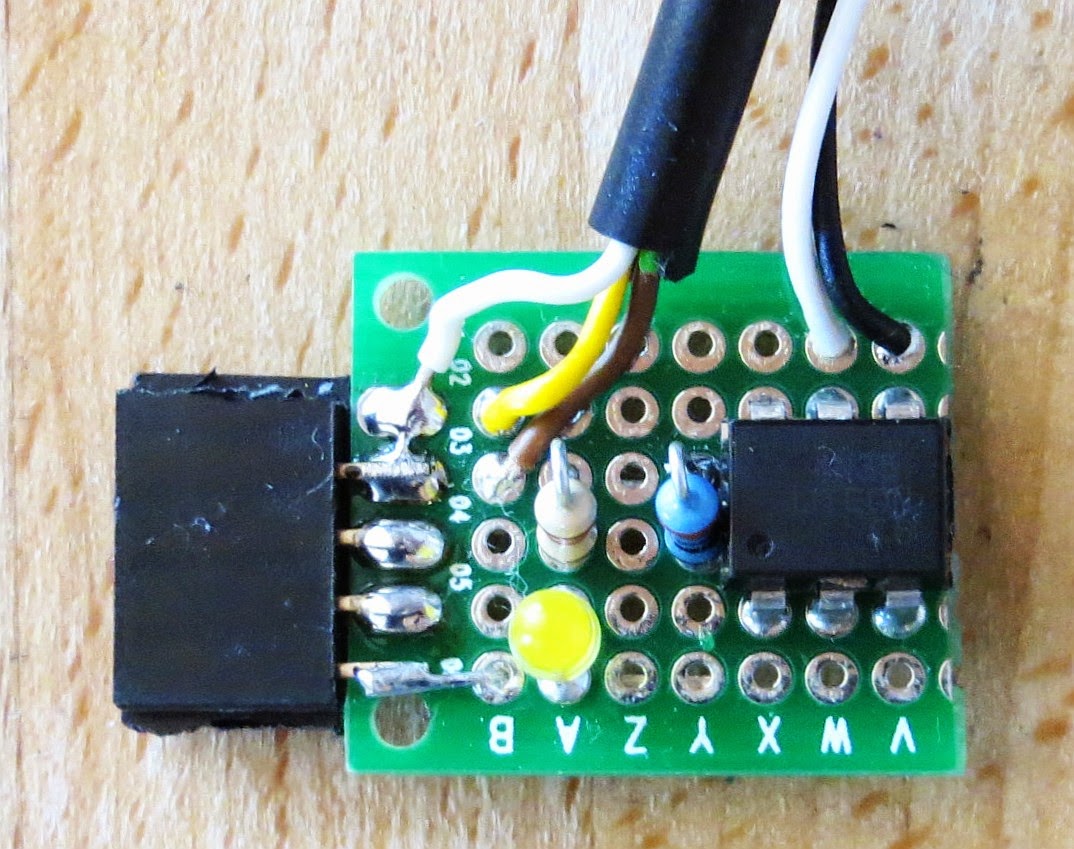
A MythTV Remote Control without LIRC - Power Switch Addon


Overview
This is a little add-on for my MythTV remote control. It adds a hardware power switch feature. This means that you can switch the PC on even if it is completely shut down. There is just one condition, which is that the remote control receiver must have power, supplied through the USB port. On most modern mainboards, this is an option in the BIOS settings. The additional hardware is relatively simple, but the added benefit is substantial, so I think it is worth the effort.

22 December 2014

A MythTV Remote Control without LIRC


Features
  • Relatively easy to build
  • Emulates a keyboard, so it needs no driver
  • Costs around 10 €
  • Is easy to configure, in under one minute
  • Works with most remote controls
  • Can easily be customised for other HTPC software
Introduction

I was always very fascinated with Objective Development's software implementation of a USB driver for Atmel controllers called V-USB. On their web site, they have a nice list of really interesting projects using this driver.

There are a few projects that translate IR remote control signals into USB HID key strokes. This has one huge advantage: You don't need any driver or software on the PC. I had use for this, since I am using a PC with MythTV to watch TV. The standard means to control it is an IR remote with LIRC.

But with LIRC I had some mixed results . It is quite a universal and versatile tool. This means you need to do a lot of configuring. You have to edit several files and it is not straightforward. And the teaching phase has always been trial and error for me.

With a microcontroller decoding the IR protocol, one part of the bothersome configuration is eliminated. And the second part can be relatively easy, as only a simple IR to key stroke assignment is needed.

24 May 2013

How to Do ISP Programming – Part 4: Fuses and Troubleshooting


Setting Fuses
 
As mentioned before, fuses are used to set a couple of things that might need to be set before the actual software starts to run. As a beginner you should not tinker with most of those settings, because it is possible to lock yourself out of in-system programming.

How to Do ISP Programming – Part 3: Software Usage


Installing the Software
As mentioned, there are many options when it comes to software. One standard program, which is available for many operating systems is avrdude. Unfortunately, it is a command line tool, which makes it less than ideal for beginners. But there are GUI frontends available. I decided to use AVRDUDESS for this tutorial. And it is quite easy to use.

23 May 2013

How to Do ISP Programming – Part 2: Hardware Considerations


What Hardware do I need?
Obviously you need the controller. This can be any Atmel ATtiny or ATMega. You need a circuit board to put the controller in (the "target board") and you need an ISP programmer. Since ISP uses a serial format, the programmer can be rather compact.

20 May 2013

How to Do ISP Programming – Part 1: The Theory


Introduction
Many of my projects use AVR controllers from Atmel. And they need to be "programmed". This means that the software needs to get written into their internal program memory.
 
For beginners, this can be a major stumbling block in any project. And I do get lots of questions in connection with programming. So I decided to write this tutorial. But my intention is not just to give a list of buttons you have to press. Instead I want you to understand what you are doing.
 
This tutorial assumes you have a Windows PC and use an USBasp programmer. They are available from your favourite auction website (very cheap, ready made, from China). Alternatively you can support their creator Thomas Fischl and buy his kit.

7 April 2012

A USB/ISP Programmer (Part 2)

Programming Software for the USBasp

There are several interesting options, how to use the USBasp programmer. The LCSoft variant was sold with the option to download a program called ProgISP V1.72 from the vendors site. Also, a schematic was available as well as the drivers for Windows. Installation was no problem. I found no user manual in English, but usage of the software is fairly straight forward.

6 April 2012

A USB/ISP Programmer (Part 1)


Introduction

When I started this blog I meant to do so mainly in order to document my own projects. I found that when I wanted to re-use parts of one of my projects I sometimes couldn't remember why I had made certain decisions. So I needed to document my work. And if anyone else could benefit from it, why not publish all in a blog?

But I never intended to bore anybody with my opinions on anything. This post is an exception, because I think I came across someone's project (or product) I really like. It is open source, so you don't have to buy anything. Also, I won't post any links to a store, etc.

How I flash my Firmware on 8-bit Atmel Controllers

I made my first steps in the old days, when PCs used to have a serial port. And my first programmer was a ponyprog serial programmer. It worked well, but some time later I decided to buy the STK500 from Atmel. This allowed me to use all existing programming modes and to directly flash from the AVR Studio. For a very long time, this was my main development tool. And it still sits on my desk. But it has disadvantages. It isn't really mobile. It needs a mains power supply. And nowadays you need a USB-to-serial converter to connect it.

I sometimes write programs on my netbook. So the way to go these days is to use a USB based programmer. There are lots on offer. But I found one that suits my needs really well. It is based on the USBasp project. This is an open source USB programmer, which is small and simple. It gets powered and controlled by the USB port. It uses standard components (e.g. an ATmega8), so you can build it yourself. A piece of perf board will do, really. Although various optimised layouts are available for download, if you want to make a PCB. Kits are available, too.

But what really surprised me was the fact that some Chinese companies manufacture USBasp compatible hardware. They are sold through the well known channels. And you can get them for almost no money. I bought two different devices for under 3 € each. And this includes shipping!


I don't know how they can sell them at such a low price. As an end user I would pay more than 4 € for the components, let alone shipping. This was an offer I could not resist, so I ordered two different versions, apparently from different manufacturers.

The Hardware

And this is what I got after waiting for a couple of weeks:

(top view)